2025 Monthly Meditation Series
Thank you for being a Monthly Meditation Member. Welcome to our 2025 Series, "Star Traveler: Journeys for Galactic Reconnection," 12 meditations to remember your stellar roots, access star wisdom, and deepen your cosmic connections.
For 2025, your monthly renewal emails now include Details and Links to download or play the Meditations.
Since these Meditation downloads expire at the end of the year, we have made it easier for you to save them to your personal computer. Audio files will be automatically downloaded to your computer when you click on the link. If you prefer videos, the links are now tied directly to the Zoom recording page so you can watch and download the video.
Scroll down for FAQs and Additional Details.
Subscriptions - Frequently Asked Questions
You will be billed $25 on the 7th of every month until cancellation. Meditations will be added to your User Account under the Download & Links tab as soon as your payment is processed.
You will receive two emails:
1) Credit Card Receipt
2) Renewal Order is Complete - we have added the mediation description and audio/video links to this email
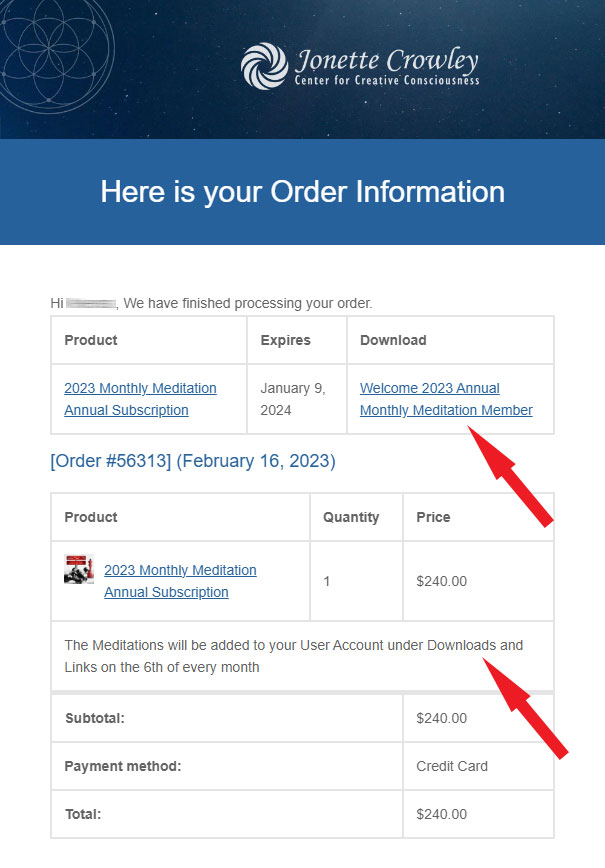
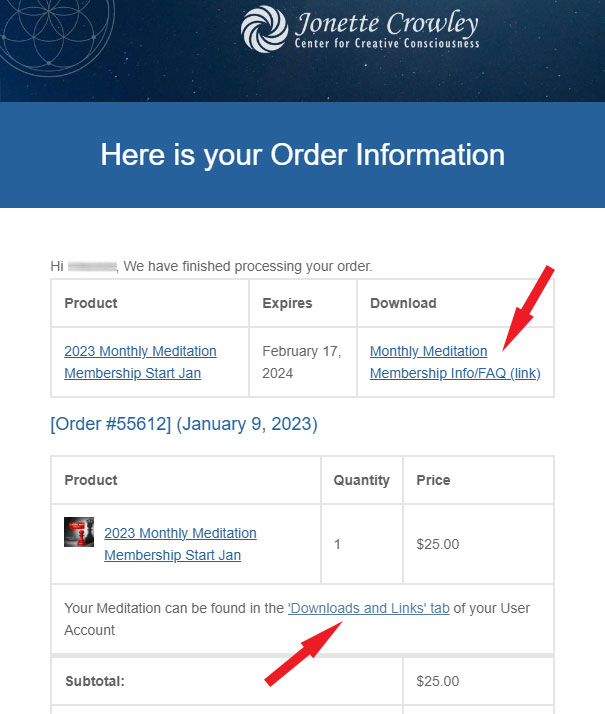
If you subscribed to the Monthly meditation for the first time the Order confirmation email will look like the one below.
EXPIRATION DATE: Your subscription continues unless you cancel. The meditations are annual series so meditation links will expire on Dec 31 of each year.
You will lose access to the links on this date, so please Remember to Download Your Recordings.
The expiration date indicated on your account might differ based on your purchase date.
The recordings, Video (MP4) and Audio (MP3) files, will be added to the Downloads & Links tab of your User Account on the 7th of every month:
AUDIO - Click blue button to automatically download the audio file
VIDEO - The blue video button will bring you to the Zoom recordings page with an option to download or watch the video files. The download option is on the upper right corner.
Please note that the downloading process is controlled in YOUR browser settings. See Additional Help Topics below for more details.
On mobile phones only: To download video, you might need to rotate your screen to a horizontal view to see the Download button at the top right of the Zoom page.
Procedures depend on your devices and setting so please search Google for specific instructions or refer to the links at the bottom.
Apple now allows you to download MP3 files directly to your phone assuming you have IOS 13 or above. The files will not be added to your music library. Instead, they will be stored in your Files. To download a file in Safari, just tap on a download link on a website or tap and hold on a link and then tap Download Linked File.
Meditation description: The description of each month’s meditation can be found by clicking on the blue product title on the left column of your Downloads & Links tab.
Additional Help Topics:
Tips for downloading MP3s to Mobile Devices:
Downloading to Mobile device
How to change download settings in Chrome:
from Google support
How to change download settings in Safari:
from Apple support
How to change download settings in Firefox:
from Mozilla support
Video (MP4) and Audio (MP3) tracks can be found in your User Account under the Downloads & Links tab on the 7th of every month.
You will receive two emails: a one-time Credit card Receipt and an Order Confirmation email (below).
Your subscription will not automatically renew.
EXPIRATION DATE: Your subscription will expire on December 31, 2025.
You will lose access to the links on this date, so please Remember to Download Your Recordings. The expiration date indicated on your account might differ based on your purchase date, but this product is an annual membership for the calendar year 2023 meditations.
Since our meditations are released on the 7th, you will receive access to the previous month's meditation upon purchase. You will be billed again on the 7th of the month for that month's meditation. The product you purchase will indicate the initial month.
How do I find My Account?
- The link to login is above the Top and in the Footer menus of our website.
- Or use bookmark this URL: https://centerforcreativeconsciousness.com/my-account
- You can also log in or create an account during checkout in our store.
Note, once you are logged in you should stay signed in when you are on our site but that depends on your personal device and cookie settings.
How do I know if I have an account?
If you have purchased anything from our website in the past, you had the option to create an account or continue as a guest
- To see if you have an account. Fill out the Register section if you are in our system you will get a pop-up saying: "Error: An account is already registered with your email address. Please log in"
- If you did not define a User Name your email address will be your Username, this can not be changed.
- If you do not remember your Username, Email us at info@jonetttecrowley.com with 'Request Username' as the subject line. Do not make a new account as accounts cannot be combined.
How do I know if I am Logged in to my Account?
Once you log in you will usually stay logged into your account when you are on our site. Although this can depend on your individual computer 'cookie' settings.
- The Account Login screen with display Hello with your name and you will see your dashboard tabs. If not, you will see a Login or Register option.
- If you are in our Store, the checkout screen will auto-populate with your information. If not, you will see an option "Returning Customer? Click here to login"
- Click here to view screenshot of the above.
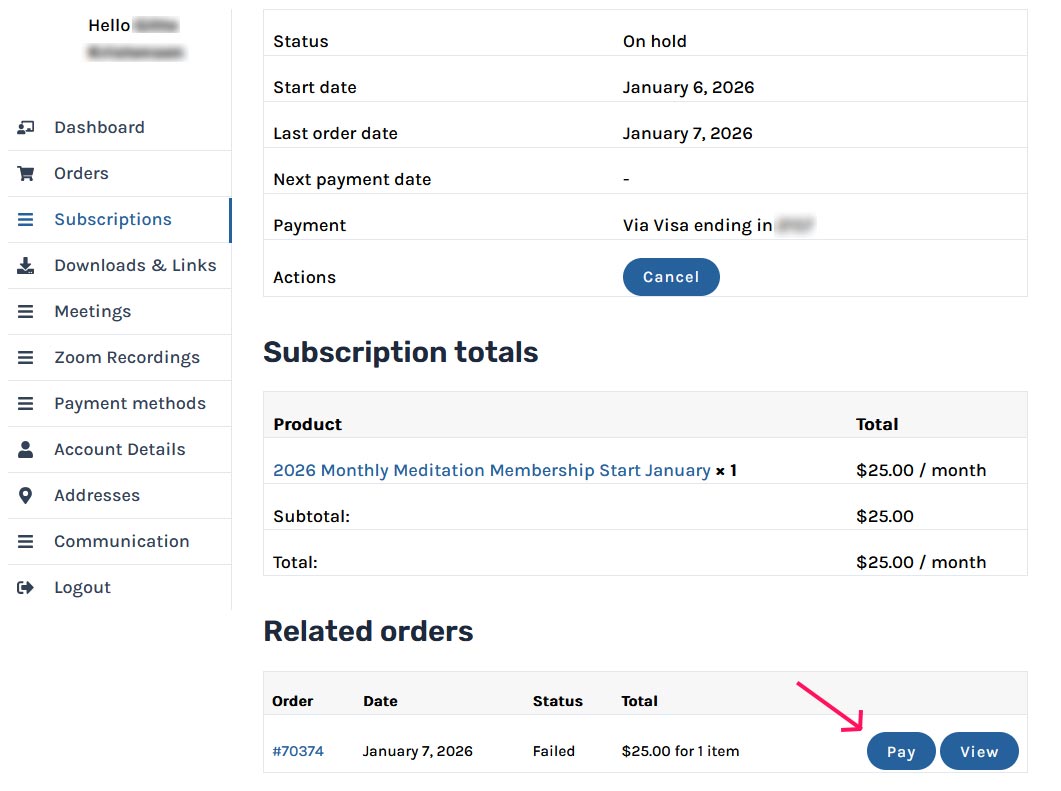
If your payment was not processed or you were issued you an invoice for manual payment. Your account will be automatically placed on hold until you make a payment
NOTE: If there are no issues with your credit card.
Please contact your credit card company to pre-approve the charges. Sometimes online or foreign transactions will trigger a fraud filter, so let them know this will be a recurring charge.
Paying from the Email Invoice
If your payment was not processed or you were issued you an invoice for manual payment. Your account will be automatically placed on hold until you make a payment.
- Pay from the Invoice. Click on the blue 'Payment page' to be directed to the payment screen.
- This will get you to the Checkout screen. Please scroll to the bottom of the page.
Before entering your new card number during the checkout process, please click on the blue 'Manage Payment Methods' button at the bottom of the Checkout screen (see screenshot below) because your old credit card is still in the system and linked to your Subscription. - After that, add a new card (click on 'Add Payment Method'), set it as the default, and delete the old one. Your new card will be tied to your subscription at the moment of payment.
- After that, add a new card (click on 'Add Payment Method'), set it as the default, and delete the old one. Your new card will be tied to your subscription at the moment of payment.
- NOTE: if your credit card isn't expired and you still need to change it, go to your 'Payment methods' link in your User account add the other card (if you haven't already), and make it the Default one. If the system asks you: "Would you like to update your subscription to use this new payment method?", click 'Yes'.
- NOTE: If you don't see a 'Change Payment' button, then you need to delete the expired credit card and your subscription will automatically be tied to your new card.
- Then choose the new credit card and Save it to your Subscription. If you don't do that, next month it won't be tied to the subscription payment.
- Please double-check that your new card number is now next to the subscription number in the 'Subscriptions' tab of your User Account.
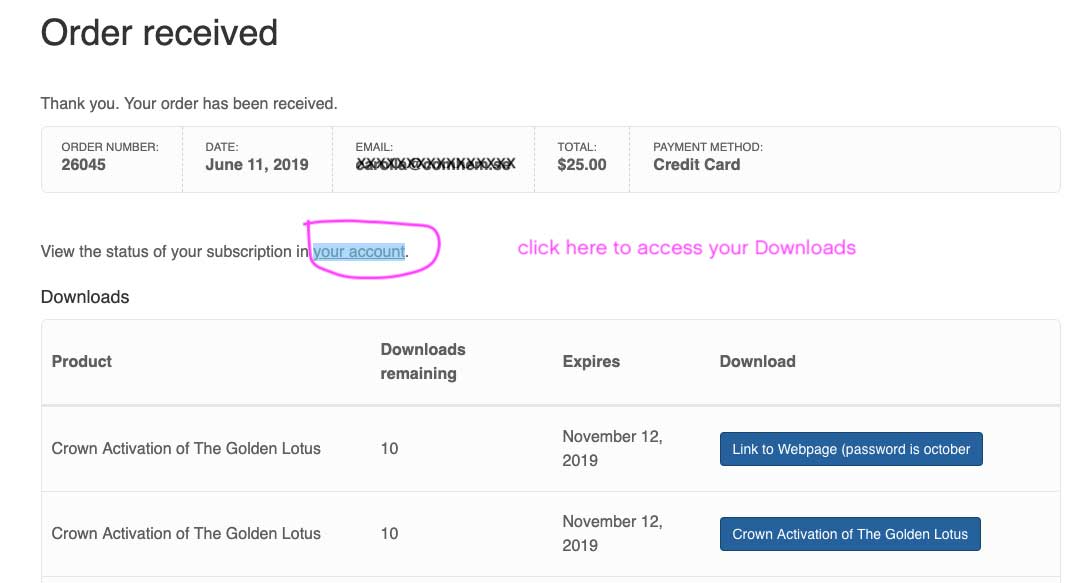
- You can now proceed with the payment. You will receive a notification of the Order received. Click on 'your account' link in 'View the status of your subscription in your account' to access your meditations.
You may ALSO pay an outstanding invoice by logging into your account dashboard - see below
Paying From Your Account Dashboard
If your payment was not processed your account will be automatically placed on hold until you make a payment.
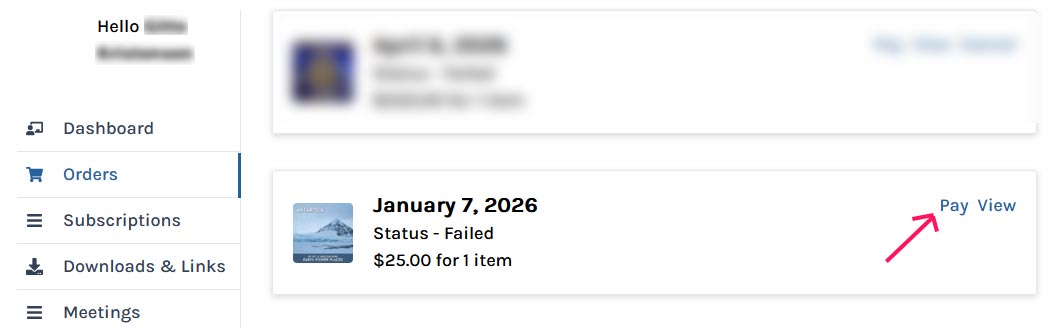
- You can access the payment screen in the Orders tab by clicking on the Pay button.
- This will get you to the Checkout screen. Please scroll to the bottom of the Checkout page.
Before entering your new card number during the checkout process, please click on the blue 'Manage Payment Methods' button at the bottom of the Checkout screen (see screenshot below) because your old credit card is still in the system and linked to your Subscription.
- After that, add a new card (click on 'Add Payment Method'), delete the old one and link your new card to your subscription by going to the 'My Account' > 'Subscriptions' tab > Click on the 'View' button to see your Subscription details > Click 'Change Payment' button (image below) and choose the new credit card. Then you can complete the payment.
- NOTE: if your credit card isn't expired and you still need to change it, go to your 'Payment methods' link in your User account add the other card (if you haven't already), and make it the Default one. The system will then ask you: "Would you like to update your subscriptions to use this new payment method?", so click 'Yes'.
- NOTE: If you don't see a 'Change Payment' button, then you need to delete the expired credit card and your subscription will automatically be tied to your new card.
- Then choose the new credit card and Save it to your Subscription. If you don't do that, next month it won't be tied to the subscription payment.
- Please double-check that your new card number is now next to the subscription number in the 'Subscriptions' tab of your User Account.
- You can now proceed with the payment. You will receive a notification of the Order received. Click on 'your account' link in 'View the status of your subscription in your account' to access your meditations.
Updating Your Credit Card from your account
AFTER UPDATING YOUR CARD INFO YOU MUST ADD IT TO YOUR SUBSCRIPTION
Updating Your Credit Card in Your User Account
- Update your credit card information in the 'Payment Methods' tab then link the credit card to your Subscription. See below.
- If you updated your credit card information under the Payment Method tab you also MUST link it to your subscription by going to the 'My Account' > 'Subscriptions' tab > click on the 'Change Payment' button.
- NOTE: if your credit card isn't expired and you still need to change it, go to your 'Payment methods' link in your User account add the other card (if you haven't already), and make it the Default one. The system will then ask you: "Would you like to update your subscriptions to use this new payment method?", so click 'Yes'.
-
Then choose the new credit card and save it to your Subscription (see image below). If you don't do that, next month it won't be tied to the subscription payment.If you have an outstanding payment due, this will not process the payment, please see above for instructions.
- If you don't see a 'Change Payment' button, then you need to delete the expired credit card and your subscription will automatically be tied to your new card.
-
Please double-check that your new card number is now next to the subscription number in the 'Subscriptions' tab of your User Account.
Updating Your Email Address
Your email address (and password) can be updated under the 'Account Details' tab.
Our website store software and our mailing lists are NOT currently connected.
If you change your email address you must update both your Account AND the Email list (see Update Your Preferences on the bottom of your emails)
Unsubscribing from our email list does not cancel your subscription, to avoid being charged you must cancel your subscription in your account dashboard.
You may update your email address under the Account details but your username cannot be changed so if it was an email address it will stay the same even if you update the email address section.
You must cancel your subscription from your User Account
Your account is controlled by you so you must initiate the cancellation process. We cannot accept email requests to cancel.
- To cancel - log in to your User Account and under the 'Subscriptions' tab click on Action: Cancel
- You can cancel at any time; however, automatic billing is done on the 7th of the month, so you must cancel prior to that day to avoid charges.
- Once your cancellation time period has ended, you will not be able to access your meditation from your User Account. Please download all meditations you want to keep.
- If you did not download the meditations prior to the December 31st expiration date, the links can be found in the monthly emails you received in the previous year. If you no longer have access to those, please contact us.
2025 Meditation Series Star Traveler: Journeys for Galactic Reconnection
12 monthly meditations to remember your stellar roots, access star wisdom, and deepen your cosmic connections.
Your Galactic Reconnection
“These meditations will ignite soul memories and reconnect you to the vast wisdom of our remarkable Universe!”
Join Jonette and meditators around the world for an intriguing series of galactic expeditions! Through channeled energy and imagery, you’ll be guided around the Universe to remember your own stellar roots and/or connect with the star beings who are guiding our Earthly evolution. The goal is to pick up forgotten energies, star-knowledge and connections.
Our monthly journeys may include destinations such as: Your Starship, Venus, Mars, Jupiter, Pleiades, Sirius, Orion, Arcturus, Andromeda, Cygnus, the Galactic Federation, and the inner Earth. These will be journeys like no others!
Monthly Meditations are published on the 7th of every month (around 3am MST / 11h CET).
"Star Traveler: Journeys for Galactic Reconnection"
Series Meditations
Available Individually for $35 each
-
2025 Meditation Series: Star Traveler
Star Traveler Meditation Series
In this series of meditations, you are invited to remember your stellar roots, access star wisdom, and deepen your cosmic connections.
Also available individually
-
Polaris: Star Traveler #12
True Alignment
Follow the luminous call of Polaris as you align with your true north, anchor into steady cosmic support, and reconnect with the radiant soul-purpose that guides every step of your path.
-
Cygnus: Star Traveler #11
Gate of the Gods
Join Jonette for a transformative meditation journey through the Cygnus constellation, where you’ll access ancient wisdom, open your visions, and reconnect with your timeless power at the heart of the Swan.
-
Moon: Star Traveler #10
Lunar Mother’s Embrace
Join the journey to the Moon in our latest Star Traveler Meditation. Release fears, receive healing from the Cosmic Mother, and awaken with the silvery light of lunar love.
-
Saturn: Star Traveler #9
Crossing Beyond Structure
Join the journey to Saturn, empowered by Titan and Rhea. Passing Saturn’s rings, you meet the Watchers, transcend limits, and return stronger and fearless—transformed by Saturn’s gifts beyond time and boundaries.
-
Pleiades: Star Traveler #8
Journey to the Pleiades
Seven celestial beings reawaken dormant codes of light within you. At their crystal city, you attend a ceremony of receiving: seven Pleiadian beings each present you with gifts of energy, wisdom, codes of healing, joy, awakening, and practical guidance.
-
Orion: Star Traveler #7
Path of Initiation
This meditation brings you cleansing, balance and harmony. Your spiritual perception opens and anchors both protection and provision into your life.
-
Earth Star: Star Traveler #6
Ground and recharge with healing Earth energy.
This meditation grounds with golden threads of light through the Earth Star chakra beneath your feet to the luminous heart of the Earth.
-
Venus: Star Traveler #5
Self-Realization in Love
Masters of Light guide you to temples where you are healed and perfected in light: enlightened, radiant, free, timeless.
-
Antares: Star Traveler #4
Meet beings from Antares!
This surprising meditation takes you to the inner Earth to connect with the loving, wise beings from Antares–the giant red star in the heart of Scorpio.
-
Arcturus: Star Traveler #3
Journey to meet the Arcturians!
Take a journey to meet the Arcturians, and learn how to create a mind-bridge to these highly evolved multi-dimensional beings.
-
Sirius: Star Traveler #2
The Star of Enlightenment
Let yourself activate your heart as a star itself to become a direct portal to Sirius and the Masters there.